Posts

How to disable VLC Media Player Flashing Pop-Up track notification on Taskbar
Image
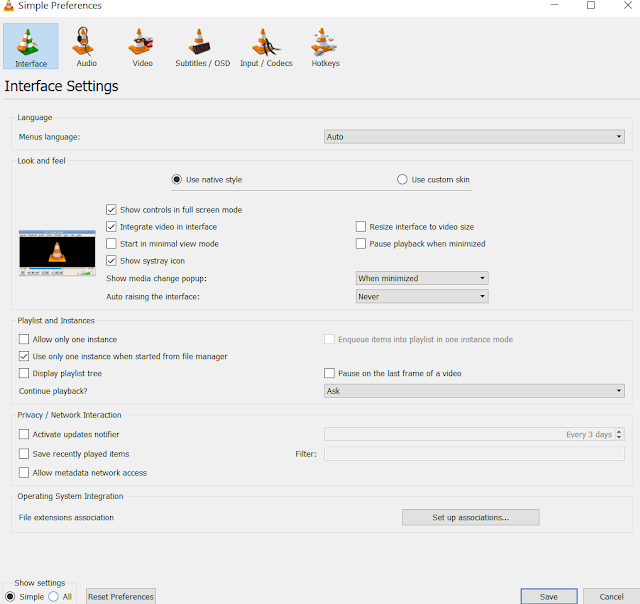
Sometimes it becomes hectic when the next video in a playlist is playing in the backgroung and VLC media player is flashing pop up track notification on the Taskar. This can be disabled as follows: Go to  Tools -> Preferences   (set Show Settings to All at bootom left corner) The similar dialog box will appear. Now go to Main interfaces -> Qt Choose "Never" in the drop down menu named Show notification popup on track change. Press Save to save VLC settings and restart VLC after that to make sure changes are enabled.

Excel with VBA-Excel

Image
VBA stands for Visual Basic for Application. It is an event driven programming language used with MS-Excel, MS-Word. Accessing the VBA editor Go to File>> Option >> Customize Ribbon >>   Tick Developer >> Press OK Click on Developer Ribbon and then click on Visual Basic.   Shortcut: Press ALT+F11 This is the VBA interface.   Writing the first Code ( Custom Formula) In VBA code is written in Modules. So, Modules can be inserted by navigating to Insert >> Module. Now in Module, Procedures are written. These are group of instructions (statements). There are two types of Procedure:  a) Sub  b) Function These both eliminates the need of writing the same from multiple times. This allows to make custom user defined functions. Here is the example of a user defined function in excel. So, the code snippet c...

Open Broadcast Software ( OBS ) - VirtualCam | Google meet | Zoom | Other video conferencing App

Image
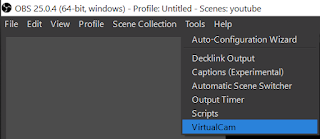
In the previous blog, basic OBS was introduced and learnt that how to stream on YouTube using OBS.  Now suppose we want to share the video output in real time on video conferencing platform like Google Meet/ Hangout, Zoom, Facebook or any other app/website that use camera of the computer device. This can be resolved using the OBS as a VirtualCam. Means that the output of the OBS is available as a virtual camera. Thus, in the setting of individual platform of video conferencing , only requirement is to change the camera from the main camera to the OBS-VirtualCam. In this blog the procedure to setup the OBS-VirtualCam will be discussed further. Setting up the OBS-VirtualCam: Browse to the Resources section in the OBSproject website or follow the link  https://obsproject.com/forum/resources/obs-virtualcam.539/  , Download the plugin and install it while closing the OBS. Now open OBS and check under the Tools menu the VirtualCam option will be available. This means...

Open Broadcaster Software ( OBS ) - Setup | Basic

Image
It is a free and an open source software for video recording and live streaming. Basically it is used for live streaming on different platforms like YouTube, Facebook, etc. using a unique key. It performs the high performance real time video and audio capturing and mixing. It create scenes made up of multiple sources including window captures, images, text, browser windows, webcams, capture cards and more and give as a video output in the real time. It is freely available on  https://obsproject.com  for Windows, MacOS, Linux. Introduction to OBS user interface : Scenes: It generates different scenes which can be switched between each other during the stream. Scenes allow us to make different screens on which elements are inserted and customized according to our requirement. To add a new screen click on " + " and type the name then press OK, a new screen will be generated. Sources: For each screen we can customize a display design for the real time s...

WiFi controlled BOT using local website

Image
In this project I have made a WiFi controlled Bot using arduino uno and ESP8266 WiFi module. The two wheeled bot is controlled from a local website that can be opened in the browser using a predefined specific IP address of the ESP8266. The local webpage code is stored in the arduino uno and it will be send to the browser when requested. Once the page is loaded in the browser then commands are sent back to the arduino using the Wifi module. The default IP address is 192.168.4.1 I have developed this project without  use of any library. Components needed: Arduino Uno -------- 1 Dc geared motor ----2 Wheel----------------- 2 Chasis ----------------1 ESP8266 -------------1 L293d------------------1 9v battery ------------1 Working Video: Arduino Code: /*  * This code is written by TRISHANK SINGH MAHUR.  * This is the code for esp8266 wifi module. In this the esp8266 is used as the local server.  * T...

Trishank Singh Mahur

Image

FB PAGE

Image
My fb page....    Click here ..

Trishank singh mahur

Image
First day for a new beginning starts from here . 

Watch me on youtube

Image
Click here to watch videos

Join with me on FB

Image
Click here to see my fb account