Posts

Showing posts with the label OBS-VirtualCam

Open Broadcast Software ( OBS ) - VirtualCam | Google meet | Zoom | Other video conferencing App
Image
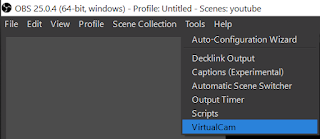
In the previous blog, basic OBS was introduced and learnt that how to stream on YouTube using OBS.  Now suppose we want to share the video output in real time on video conferencing platform like Google Meet/ Hangout, Zoom, Facebook or any other app/website that use camera of the computer device. This can be resolved using the OBS as a VirtualCam. Means that the output of the OBS is available as a virtual camera. Thus, in the setting of individual platform of video conferencing , only requirement is to change the camera from the main camera to the OBS-VirtualCam. In this blog the procedure to setup the OBS-VirtualCam will be discussed further. Setting up the OBS-VirtualCam: Browse to the Resources section in the OBSproject website or follow the link  https://obsproject.com/forum/resources/obs-virtualcam.539/  , Download the plugin and install it while closing the OBS. Now open OBS and check under the Tools menu the VirtualCam option will be available. This means...

Open Broadcaster Software ( OBS ) - Setup | Basic

Image
It is a free and an open source software for video recording and live streaming. Basically it is used for live streaming on different platforms like YouTube, Facebook, etc. using a unique key. It performs the high performance real time video and audio capturing and mixing. It create scenes made up of multiple sources including window captures, images, text, browser windows, webcams, capture cards and more and give as a video output in the real time. It is freely available on  https://obsproject.com  for Windows, MacOS, Linux. Introduction to OBS user interface : Scenes: It generates different scenes which can be switched between each other during the stream. Scenes allow us to make different screens on which elements are inserted and customized according to our requirement. To add a new screen click on " + " and type the name then press OK, a new screen will be generated. Sources: For each screen we can customize a display design for the real time s...